

If you’re looking for the skills to take the next step in a career in public policy, non-profit administration or management, the Master of Public Administration at Johnson & Wales University (JWU) Online could be the degree you are looking for.
According to the Bureau of Labor Statistics (BLS), employment in areas in this field is projected to grow over the next decade, including management positions in emergency planning, social and community service and non-profit organizations. An MPA degree from JWU Online could help advance your career in one of these fields, or another path you aspire to choose.
What Makes the MPA Program at JWU Online Unique?
At JWU Online, our Master of Public Administration program is a rigorous program that develops research, policy analysis, critical thinking, writing and presentation skills applicable to organizational problem-solving. Within the program, you’ll develop skills for effective leadership, management and budgeting, with courses that are relevant to students who want to become supervisors or strengthen their ability to lead organizations.
“At Johnson & Wales, you’ll learn critical thinking, along with the ability to put your thoughts and concepts learned from the course to help your organization improve or to assist with a problem in the organization,” said Dr. Murray Widener, who developed the MPA program at JWU Online.
Coursework within the MPA program also delves into aspects of public policy analysis, giving students the tools to examine the elements of effective policy and supporting the development of sound policies.
“In the Master of Public Administration program, I’ve learned so much that will help me get more in depth with nonprofit management and with making legislative policies,” notes Emmeline Orellana, ’24 MPA. “I’m applying what I learned about fundraising and nonprofit management to my job at the Providence Housing Authority (PHA). I’ve been able to conduct evaluations for the programs I’ve worked with. And all the knowledge and skills I’ve gained have helped build my resume. Earning the Master of Public Administration degree from JWU Online has pushed my career forward toward my goal of advancing into leadership positions.”
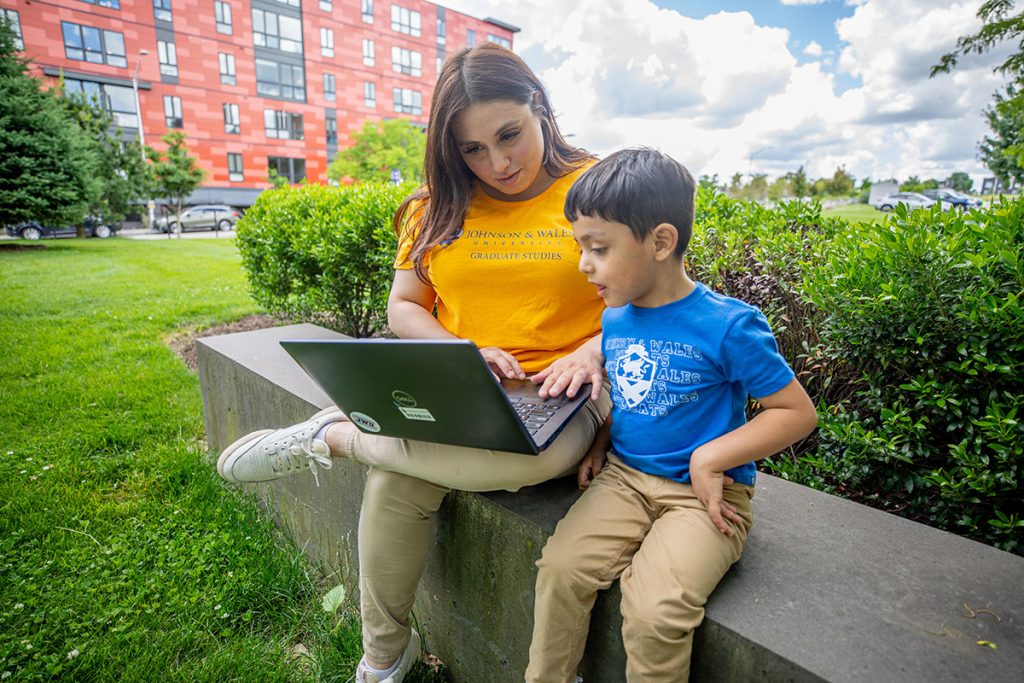
Best of all, JWU Online’s 100% asynchronous online MPA program allows students the ability to earn their degree at their own pace. This flexibility lets students balance the demands of their personal and family commitments against their academic responsibilities.
“I like learning in person in the classroom, but for where I am right now in my life, it has been so helpful to be able to take the program online,” explains Orellana. “The online program is different in that you do not meet with teachers and advisors in person, but the same in the sense that, at JWU Online, you still get the same amount of help. The MPA program was flexible enough for me to be able to give my son the time that he needed, even while working and going to school. I was able to study at my own pace, while working at a full-time job and taking care of my son.”
Learn from Industry-Experienced Faculty

Dr. Murray Widener facilitated the development of the online MPA program and has taught nearly all courses in the program since its launch in 2014. He has over two decades of experience teaching in-person and online public administration and criminal justice courses. A highly-experienced law enforcement professional, Dr. Widener has over 20 years of experience training law enforcement officers and agents at the federal and local level.

Lindsey Donston has worked for 14 years for the State of Connecticut in various agencies and roles, including at the Department of Social Services (DSS), the Connecticut Department of Transportation, the Office of Health Strategy and the Connecticut General Assembly’s Office of Fiscal Analysis as a Budget Analyst. She currently serves as CFO and School Business Administrator of Clinton Public Schools in Connecticut.
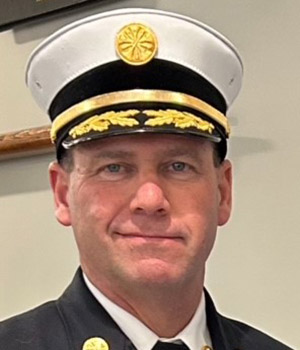
Peter McMichael currently serves as the Chief of the Warwick Fire Department in Warwick, Rhode Island, as well as the Director of Emergency Management for the City of Warwick. In addition to his four decades of service as a firefighter, McMichael has years of emergency management experience helping Warwick navigate through adverse weather events, flooding and the COVID pandemic.
“Johnson & Wales University’s MPA program distinguishes itself primarily through its practitioner-oriented focus on mission-driven leadership rather than purely bureaucratic governance,” states Donston. “Unlike programs that lean heavily into abstract administrative theory, JWU embeds applied competencies like resource development, nonprofit budgeting and program evaluation directly into its core requirements. I also find that its accelerated, fully online format offers a realistic pathway for working professionals balancing active public-sector careers. Furthermore, the faculty bring genuine frontline experience, ensuring classroom discussions mirror current workplace environments.”
Trista Collins ’24, MPA appreciates not only the responsiveness and the attentiveness from her professors in the program, but she praised the wealth of knowledge that each professor brings to the program.
“The instructors have been absolutely phenomenal. The varied experiences that the instructors all have are pretty amazing. They don’t all come from the same background; they each seem to have had very diverse backgrounds and are very knowledgeable in their perspectives. They taught us how to apply what we’re learning to our current careers, not just focusing on how it will impact us when we get our degree.
“I really feel like they went above and beyond to understand where all the students came from, too. I think that’s something else I love about the instructors with JWU; it’s not just a matter of us trying to understand the professors. The professors really engage in trying to understand our backgrounds and how we’re bringing information and experiences to this program.”
Career-Relevant Curriculum
JWU Online’s MPA program features a robust and career-oriented curriculum that develops critical thinking and the ability to translate course concepts into practical recommendations. The curriculum delves into best practices around public policy and nonprofit management, along with a solid foundation in leadership skills.
“By learning about how nonprofit organizations grow and fundraise in one of my courses, I was able to lead the program development committee of a nonprofit organization,” noted Alice Msumba ’24, ’27 MPA. “I was able to apply that knowledge right away, and it allowed me to grow professionally.”
The course Public Policy Analysis, taught by Adjunct Faculty Member Donston, demonstrates the curriculum’s applicability to real-world problem solving. “The course serves as a bridge between political theory, administrative practice and measurable real-world outcomes,” explains Donston. “Public administration programs train leaders to manage organizations, budget resources, and implement programs. The public policy analysis course equips administrators with the tools to determine what should be implemented, why and whether it will actually work.”
The course Emergency Management Planning, taught by Adjunct Faculty Member McMichael, underscores the importance of all public administration officials during times of crisis — not just first responders. McMichael notes that the course provides students with knowledge that will allow them to be more of a valued asset to their organization when disaster strikes and be able to hit the ground running.
“Many people think that emergency management is the responsibility or purview of those individuals that work in the Office of Emergency Management, or the Fire and Police Departments. But the reality is that during a crisis or disaster, everyone has a seat at the table, and everyone has a role to fill. The finance director of a municipality and his or her staff have a responsibility to track and document costs associated with a disaster. The importance of accurate record keeping will be paramount to the ability to apply for and receive federal disaster reimbursements and grants. When disaster strikes, it’s all hands on deck.”
In addition, students can tailor their studies to their individual interests through electives in concentrations including management and criminal justice. The applicability of the curriculum to fields outside of public administration shows the breadth of knowledge students receive and the opportunity for students to apply the concepts of the program to fields outside of the public sector.
“The program is geared towards public managers, public administration and public management of organizations,” notes Widener. “However, the core concepts of the program are applicable across a wide variety of industries, including nonprofit and even private sector agencies and organizations.”
For a complete listing of courses in the program, please visit the MPA program catalog page.
Personalized Support From Day One
At JWU Online, everyone is invested in your academic and professional success. We supplement this experience with concierge-level service that begins at the admissions level and continues throughout your enrollment in the MPA program. From the time you inquire about JWU Online, you’ll have an admissions associate that will personally walk you through the entire enrollment process. In addition, you’ll have a personal financial planner that will answer all your questions about financial aid.

Collins recalls the help she received from the financial planners at JWU Online, particularly Michelle Doss being especially helpful in working with her to cover the cost of the program.
“It’s a huge financial investment, and they’ve always been super responsive and helpful, I think just knowing that you have people that can answer your questions and guide you through the process of what is accessible financially and what you can do is just phenomenal.”
Upon enrolling at JWU Online, the support you receive continues throughout your time in the MPA program. You’ll have access to a number of academic support services, as well as a dedicated academic advisor to support you during every step of your academic journey.
“Academic advisors work closely with students throughout their academic journey, serving as dedicated partners in their success,” explains Jessica Rounds, Academic Advisor and Manager of Academic Advising. “In addition to assisting with course planning, registration and academic progress, advisors provide personalized guidance, encouragement and support to help students achieve their goals. Through ongoing communication by phone, email and text, academic advisors help students stay on track, navigate challenges, make informed decisions and confidently progress toward graduation.”

“After I registered for the final semester of my B.S. in Healthcare Management, I began having discussions with my advisor about the graduate programs offered at JWU,” recalled Msumba. “Jess helped me think about which graduate program would be best for me and my career path, and the MPA best aligned with where I want to take my career. The support I received from JWU staff and professors during my undergrad studies made JWU the easy choice for my graduate studies.
“Jess has been great to work with over the years. She responds to my emails quickly and always finds time to meet with me to discuss courses and brainstorm on the right sequence of courses to make sure I have the prerequisites before registering. Jess has been a great partner and her support during my undergrad is a significant part of why I chose JWU for my graduate studies.”
Collins expresses gratitude for how JWU Online’s MPA program is helpful in identifying your own personal strengths and areas where you can develop as a professional.
“I think people just really need to not put it off. If people have ever thought about going back to school, they should just do it. It’s intimidating at first to think of, but once you get into it you realize at JWU, you have all the support you need to do it. There’s just no reason not to.”
Ready to take the next steps towards enrolling in our fully-online Master of Public Administration degree program at JWU Online? Complete the Request Info form, call 855-JWU-1881, or email [email protected].